Download the
Paisabazaar app Today!
Paisabazaar app Today!
Get instant access to loans, credit cards, and financial tools — all in one place

Get the app — instant card and loan offers!

Our Advisors are available 7 days a week, 9:30 am - 6:30 pm to assist you with the best offers or help resolve any queries.


Get instant access to loans, credit cards, and financial tools — all in one place

Scan to download on


 Personal Loan
 Business Loan
 Home Loan
 Other Loans


Our Advisors are available 7 days a week, 9:30 am - 6:30 pm to assist you with the best offers or help resolve any queries.
600 or 750? What's your credit
score? Check for FREE.


Let’s Get Started
 +91
+91
The entered number doesn't seem to be correct
| Note: Citibank has been merged with Axis Bank. To know more about UPI services provided by Citibank, click here. |
Citibank, along with its internet banking and mobile banking services, provides its customers with the option to transfer inter-bank funds using the Citibank BHIM UPI mobile app. Citibank has collaborated with the BHIM app which is an initiative by NPCI (regulated by the Reserve Bank of India).
In order to transfer funds from one bank account to another bank account, it is important that first of all, you register with the Citibank BHIM UPI app. To use UPI, you require a smartphone, debit card and a safe network connection. Read on to know the steps to register, how to send money via UPI and to request funds.
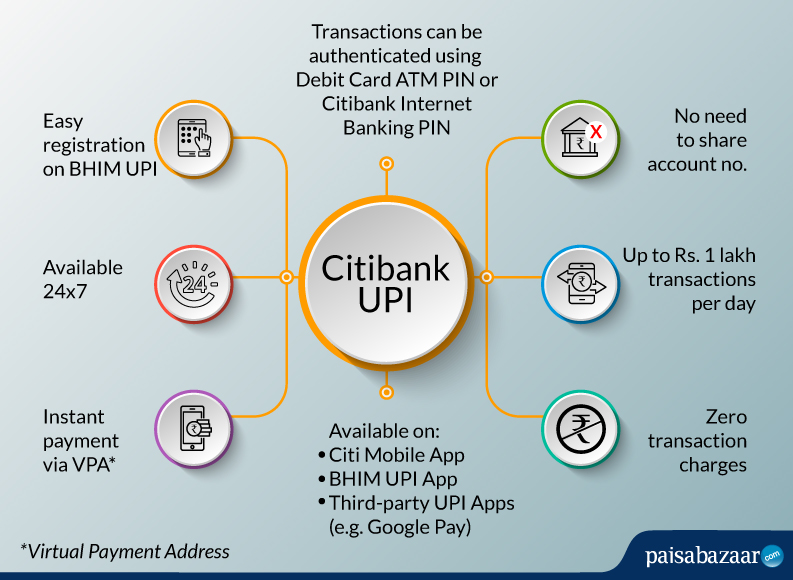
All banks that participate in UPI allow their account holders to send and receive money through a VPA (Virtual Payment Address). This eliminates the need for entering additional bank information such as account number, IFS code, etc.

Get Free Credit Report with monthly updates. Check Now
To register with Citibank UPI, the customer must have activated the mobile banking facility for their account. They can activate mobile banking by sending an SMS with the word “MBANK” (without the quotation marks) to 52484. The customer may also visit their respective branch for additional information.
After activating mobile banking, the customer can do the following.
To use BHIM Citibank UPI app, first of all you need to install the Citi Mobile app from App Store or Google Play and register yourself there.
Follow the steps stated below for sending or receiving/requesting money using UPI:
For sending money
You will be notified once the receiver will get money. This should happen in seconds.
Another method is “Scan & Pay”. This can be used if the receiver is nearby and you have access to his/her QR code.
Make sure that the app has permission to access camera.
For receiving/requesting money
You will receive a notification once the sender sends you the money requested. This money will be added directly in your linked bank account.
A Good Credit Score ensures you manage Your Finances Well
Check Now
The following mentioned are the key features of Citibank BHIM UPI:
Being a new mode of payment, not every Citibank UPI customer is familiar with the concept. This is when you can take help of the Citibank customer service team. Dial the below-stated number to have your queries sorted:
1860 210 2484
A high Credit Score may help you get a credit card with better benefits. Check Now
What do I need to use UPI for my Citibank Account?
You need 3 things to use UPI:
What are the timings of using UPI?
UPI services are available 24×7. This means you can send or receive money anytime, irrespective of the bank’s timing.
What are the charges for using UPI?
There are no service charges levied for transaction via UPI.
What is the maximum amount that can be transferred in a day using UPI?
UPI’s daily transaction limit – Rs. 1 lakh
Can I pay money to someone if I don’t know his/her account number?
Yes. Using UPI, you can transfer funds without adding bank account details. You only need the person’s UPI ID or Virtual Permanent Address. This is the USP of UPI transfers.
Can user stop the fund transfer through UPI once it is initiated?
No. Citibank UPI is an instant mode of fund transfer and it transfers the money instantly into the receiver’s account. In any case, customers can contact their respective branch and the Citibank UPI if the funds are transferred into wrong bank account due to errors while entering the mobile number or VPA of the receiver.