Download the
Paisabazaar app Today!
Paisabazaar app Today!
Get instant access to loans, credit cards, and financial tools — all in one place

Win Assured Cashback

Our Advisors are available 7 days a week, 9:30 am - 6:30 pm to assist you with the best offers or help resolve any queries.


Get instant access to loans, credit cards, and financial tools — all in one place

Scan to download on



 Personal Loan
 Business Loan
 Home Loan
 Other Loans


Our Advisors are available 7 days a week, 9:30 am - 6:30 pm to assist you with the best offers or help resolve any queries.
Bharat Interface for Money (BHIM) is a mobile app that helps its users make instant and hassle-free payment transactions using Unified Payments Interface (UPI). BHIM app provides access to its users to make instant bank-to-bank payment transactions. It also helps users to pay and collect money using their registered mobile number or Virtual Payment Address (UPI ID). National Payments Corporation of India (NPCI) has also launched its own UPI app called BHIM app to facilitate quick UPI transactions.
600 or 750? What's your credit
score? Check for FREE.


Let’s Get Started
 +91
+91
The entered number doesn't seem to be correct
NPCI has launched the Bharat Interface for Money (BHIM) app for carrying out UPI transactions. This app supports UPI transactions for all banks. Available in multiple languages, this app ensures people from all parts of the country can use this app irrespective of the language they speak and understand. It also allows you to pay bills using Bharat Billpay and set UPI mandates for recurring payments. Let us know more about BHIM app.
Bharat Interface for Money (BHIM) is a fast and secure mode of transactions using the Unified Payment Interface (UPI). Through BHIM, individuals can transfer funds from one bank account to another and collect money using the payee’s mobile number or VPA. Anyone having a bank account, a registered mobile number with that account, and a debit card can use this service. The service is available 24/7 and individuals can utilize this service on the go in their preferred language. Let us discuss the features, how to set up, steps to send and receive funds, and other facilities offered by BHIM UPI.
Also Read: Unified Payment Interface
Table of Contents
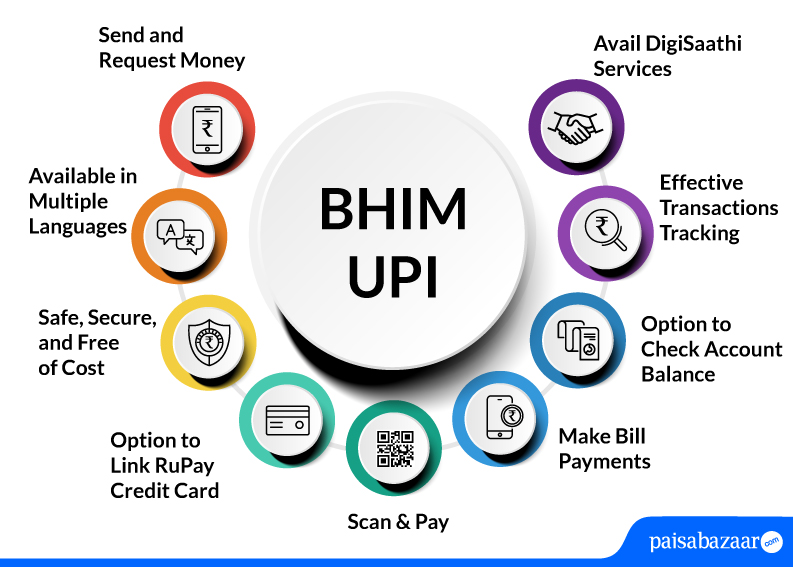
Find below the salient features of the BHIM UPI app:

A Good Credit Score can help in getting Loan Approvals Easily Check Now
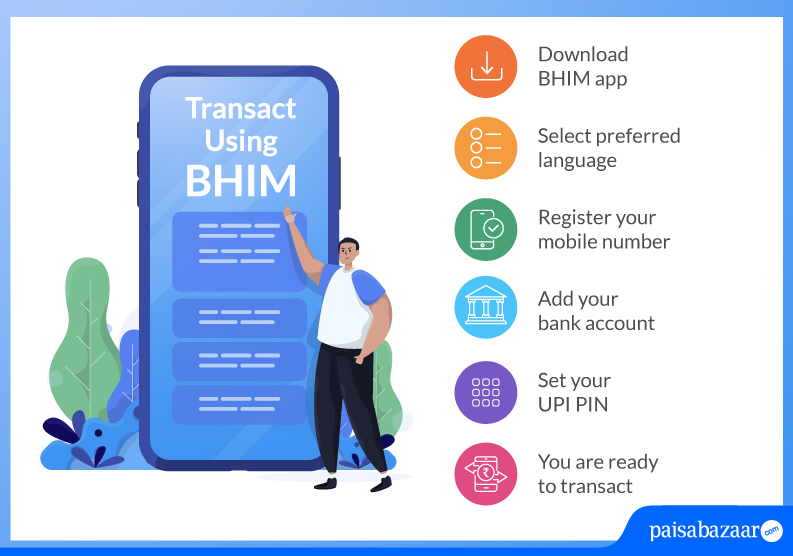
Find below the simple steps to download and register for BHIM UPI App:
Step 1: Download and Install BHIM app from Google Play Store/ Apple App Store
Step 2: Select your preferred language from 20 languages spread across the nation
Step 3: Select the SIM card with the registered mobile number with the respective bank
Step 4: Set the application passcode required
Step 5: Link your bank account using the Bank Account option
Step 6: Set your UPI PIN by entering last 6 digits of debit card and its expiry date
Step 7: Click on send and enter UPI ID
Step 8: Enter the UPI PIN that you set previously to authenticate the transaction
Step 9: Check ‘Transaction’ to see the transaction’s status
VPA stands for Virtual Payment Address. It is a unique identifier that can be used to send and receive money through UPI (Unified Payment Interface). The format of VPA in UPI is abcdef@bankname. However, by default, BHIM creates a VPA in the format – <mobile number>@upi.
Follow the below-mentioned steps to create a UPI ID or VPA in the BHIM app:
Step 1: Open the BHIM app on your smartphone
Step 2: Select your preferred language and select Verify Mobile Number
Step 3: Choose your respective bank and the app shall automatically fetch your bank name, IFSC code and account number
Step 4: Select the account you want to link with the BHIM app
Step 5: Select your desired 4 or 6-digit PIN to create a unique UPI ID to access the BHIM app
BHIM UPI Lite is a feature of UPI Lite that enable the users to make low-value transactions without using a UPI PIN. BHIM UPI Lite is an on-device wallet that uses the NPCI Common Library (CL) to process transactions.
The BHIM UPI Lite feature requires you to add the balance from your bank account to the wallet from where the transaction can be carried out.
UPI Credit Line on BHIM app is a pre-approved credit line offered by banks to perform payment transactions via UPI. This feature permits users to make payments from the credit line issued by the lending bank, irrespective of the balance in the bank account.
Your credit line can be linked by opening the BHIM UPI app and clicking on the payment method to add a credit line. Further, the user needs to select the respective bank to create a UPI PIN, and start making the UPI transactions from the assigned credit line.
To change/reset your UPI PIN on BHIM, follow the below-mentioned steps:
Step 1: Open the BHIM UPI app and choose your bank account on the left side of the home page
Step 2: Tap on ‘Change UPI PIN’
Step 3: On the next page, enter the 4-digit old UPI PIN and then enter a new 4-digit UPI PIN
Step 4: Confirm the new UPI PIN entered. Your UPI PIN will be changed
If in case you forget your UPI PIN, follow the below-mentioned steps:
Step 1: Open the BHIM app, choose your bank account, and tap on ‘Forgot UPI PIN’
Step 2: Enter the last 6 digits of your debit card and its validity
Step 3: Enter the OTP received
Step 4: Enter your 4-digit card PIN and on the next page, set your 4-digit UPI PIN
Step 5: Confirm the new UPI PIN by entering again. Your UPI PIN will be changed
Your Credit Score Is Now Absolutely Free Check Now
RuPay Credit Cards can be linked to UPI apps and customers can make UPI transactions directly from their BHIM UPI app. These cards are virtual credit cards that provide seamless digital transactions. Customers can easily make payments to merchants just by scanning the UPI QR code. It is to be noted that cash withdrawal is not permitted through this card.
You can make UPI transactions through BHIM using your RuPay credit cards as well. For this, you have to link your RuPay credit card from any bank with the BHIM App. Steps to link your RuPay credit card and pay with BHIM UPI are further discussed:
Step 1: Open the BHIM UPI app on your smartphone and enter the passcode
Step 2: Click on the bank account and add an account
Step 3: Select the credit card and then select the credit card issuer bank
Step 4: Select your credit card and click on “Confirm”
Step 5: Click to view accounts and select it from the available options
Step 6: Set your desired UPI PIN and wait until it displays “UPI PIN set successfully”
The salient features of the RuPay Credit Card are mentioned below:
Note: Cash withdrawal at merchant, P2P, P2PM, and card-to-card payments are not allowed via RuPay Credit Card on UPI.
BHIM Bill Pay is available only for banks that are enabled on Bharat Bill Pay.
The transaction limit of BHIM UPI app is mentioned below:
Checking Credit Report monthly has no impact on Credit Score Check Now
The below-mentioned process explains how to send and receive money through BHIM UPI App:
Find below the steps wherein BHIM users can send money by using one of the following details of the beneficiary.
Step 1: Open your BHIM app and enter your login passcode
Step 2: Tap on ‘Send’ option
Step 3: Enter the virtual payment address (VPA) and tap on verify to check the name of the payee
Step 4: Name of the payee will be fetched from the bank. Enter the amount and remarks for the transaction and tap on ‘Pay’
Step 5: Enter the UPI PIN. The transaction will be successful
Step 1: Open the BHIM app and enter your login passcode
Step 2: Tap on ‘Send’ option
Step 3: Enter the mobile number and tap on verify to verify the name of the payee
Step 4: Payee’s name will be fetched if the payee is registered on *99# BHIM. Enter the amount and remarks for the transaction
Step 5: Tap on ‘Pay’ to complete the transaction
Step 6: Check all the details added and then enter the UPI PIN. The transaction will be successful upon entering the UPI PIN
Step 1: Open BHIM UPI app and enter the passcode to login
Step 2: Click on ‘Send’ option
Step 3: On the top right, tap on A/C+IFSC option and select the account of the payee
Step 4: Enter the details of the payee such as Bank IFSC, Beneficiary’s name, Account number, Confirm account number and tap on ‘Verify’
Step 5: Enter the UPI PIN to complete the transaction and your transaction will be successful
The user can receive money using BHIM app in three ways:
Step 1: Open the BHIM UPI app and enter the passcode to login
Step 2: Tap on the ‘Receive Money’ option and enter the VPA of the payer to collect money. Click on ‘Verify’ to verify the name of the payer
Step 3: Enter the amount and remarks
Step 4: The Initiator will receive a confirmation once the request has been sent and will also be notified once the payer accepts the request for money
Step 1: Open the BHIM app and log in using your passcode
Step 2: Tap on ‘Receive Money’ option
Step 3: Enter the mobile number to receive money and tap on verify to check the name of the payer
Step 4: Once the payer’s name is reflected, enter the amount and remarks
Step 5: You will receive a confirmation of the request sent
Step 6: The request to collect money will be sent and you will be notified once the payer accepts the request
Step 1: Open the BHIM app using your login passcode
Step 2: On the right side of your home page, choose the option to generate a QR code
Step 3: Generate the QR code from there and share the QR code with the payer for collecting money
To perform international transactions using BHIM UPI app, you may follow these instructions:
Step 1: Open the BHIM UPI app and go to your profile
Step 2: Select your bank account from the “My Linked Bank Accounts” section
Step 3: Tap on “UPI Global”
Step 4: Choose the validity period for the feature
Step 5: Enter your UPI PIN to confirm the activation
After the activation, you can use the BHIM UPI app for international transactions by:
In case there is any issue faced while making transactions on the BHIM app, customers can reach out to the BHIM UPI customer care toll-free number mentioned below:
| Axis Bank | Bank of India | Bank of Maharashtra |
| HDFC Bank | ICICI Bank | Indian Bank |
| PNB | SBI | Union Bank |
| YES Bank | ||
Besides the above-mentioned leading banks, more than 440+ banking institutions are offering BHIM UPI services. These banking institutions include private and public sector banks, cooperative banks, regional rural banks, small finance banks, etc.
Ans. The BHIM full form is Bharat Interface for Money. It is also mentioned on the BHIM app logo.
Ans. BHIM UPI is a free National Payments Corporation of India (NPCI)-backed mobile application for online fund transfer. There are no charges applicable as of now.
Ans. To use BHIM, individuals must have a bank account, a registered mobile number with the bank and a debit card.
Ans. BHIM can be used any time of the day as it is a 24×7 service.
Ans. BHIM provides simple and secure transactions on the go in an individual’s preferred language.
Ans. Yes, BHIM UPI is safe and secure as it follows the strict guidelines defined by NPCI that ensures the safety of users’ financial and personal information.
Ans. The maximum transaction limit set by BHIM is Rs. 40,000 per day for accounts that are linked with BHIM.
Ans. You can make only 10 transactions per day and the total amount shall not exceed Rs. 40,000 per day from one account.
Ans. Firstly, you should check it twice before sending money, but if you have sent it to the wrong person then you may visit the receiver’s bank branch to inform them and provide a written request to return the sent amount.
Ans. BHIM can be currently accessed on handsets with iOS (version 13.0 and above) & Android OS (version 5.0 and above).
Ans. Yes. You can use the BHIM app without the internet by dialing *99# to avail offline features of BHIM.
Ans. As notified in BHIM, it may take up to three working days for you to get the deducted money back.
Ans. You can add two VPAs as BHIM allows you to add two VPAs. The first VPA is the default VPA (mobile number@upi). You can create the second VPA by going to the ‘My Profile’ page.
Ans. It is not mandatory to enable mobile banking to use BHIM. Only your mobile number should be registered with your bank.
Checking Credit Report monthly has no impact on Credit Score Check Now