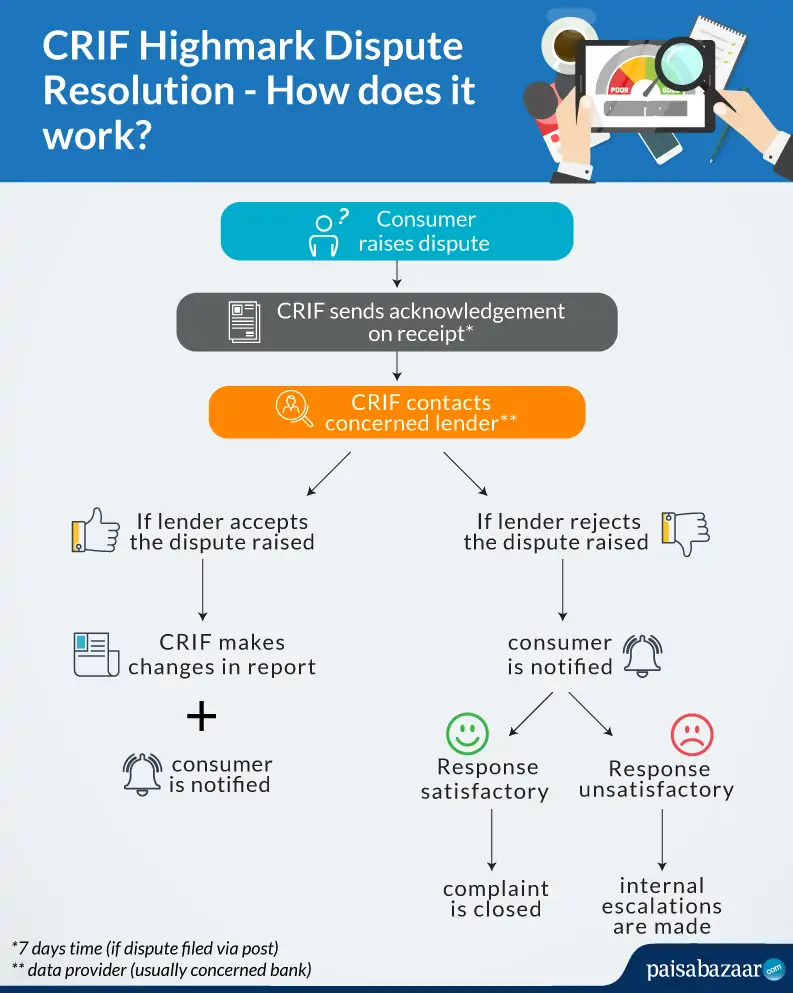
Once you’ve analyzed your credit report thoroughly and are sure of the errors, you can follow the below-mentioned simple steps to raise a dispute with CRIF High Mark:
Step 1: Log in onto the official portal of CRIF High Mark
Step 2: Enter your details on the login page to locate your account linked in the CRIF report
Step 3: Click on the “Raise a Query” tab and select the dispute category
Step 4: Enter your query details, and correction required and click on the “SUBMIT” button
You can email your concern as well at crifcare@crifhighmark.com
Customer Care Numbers: 020-6715-7771/776 /779/780 (9:00 AM to 6:00 PM, Monday to Friday)
Contact Address:
FOFB -04, 05,06, 4th Floor Art Guild House, Phoenix Market City
CTS no. 124/B, 15, LBS Marg, Kurla West, Mumbai, Maharashtra, 400070
Important Points for Filing Dispute(s) with CRIF High Mark
- Quote your CRIF High Mark Reference Number/Report ID (mentioned in the top right corner of your report)
- Keep the Subject Line as your CRIF High Mark Reference Number
- Provide details of your CRIF Account (S. No.) and contact information along with the account information being disputed/complained
- Only actual errors will be classified and treated as Complaints/Grievances; the rest of the communication will be labeled as Requests or Queries
- The bureau will send you a Ticket Number upon receipt of your correspondence. In case you wish to enquire about the progress of your dispute filed, quote this number in your inquiry.