Download the
Paisabazaar app Today!
Paisabazaar app Today!
Get instant access to loans, credit cards, and financial tools — all in one place

Win Assured Cashback

Our Advisors are available 7 days a week, 9:30 am - 6:30 pm to assist you with the best offers or help resolve any queries.


Get instant access to loans, credit cards, and financial tools — all in one place

Scan to download on



 Personal Loan
 Business Loan
 Home Loan
 Other Loans


Our Advisors are available 7 days a week, 9:30 am - 6:30 pm to assist you with the best offers or help resolve any queries.
600 or 750? What's your credit
score? Check for FREE.


Let’s Get Started
 +91
+91
The entered number doesn't seem to be correct
The full form of TRACES is TDS Reconciliation Analysis and Correction Enabling System. It is an online portal of the Income Tax Department which helps connect all stakeholders involved in the administration and implementation of Tax Deducted at Source (TDS) and Tax Collected at Source (TCS). The TDS Traces website is primarily used to view and download key tax documents such as Form 16, Form 16A and Form 26AS.
The TDS TRACES website allows tax payers as well as TDS deductors carry out a range of activities including but not limited to the following:
The online services available through TDS TRACES website provide a hassle-free system to carry out a wide range of tax-related activities. This has replaced the earlier paper-based systems which were significantly more time consuming. Through this online rectification system, PAN details and challan corrections can be made with ease.
The following are the key links available to those who log into the TDS TRACES website:
The various facilities/services offered by TRACES can be classified into three key categories:
In order to use the various online services accessible through TRACES (TDS Reconciliation, Analysis and Correction Enabling System), tax payers/PAO/Deductor are required to register on the TDS TRACES website. The following are the key steps for registration on TRACES:
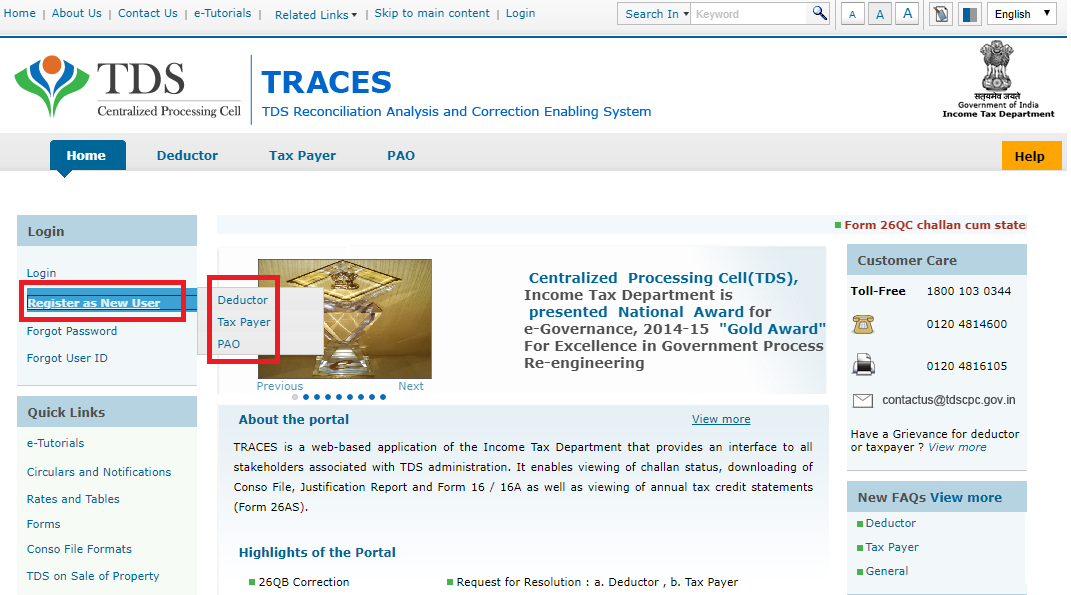
Step-1: Go to the TRACES website and click on the “Register as new ” link to access the option to register as Deductor, Tax Payer or PAO.
Step-2: If you click on the Tax Payer link shown above, you will be directed to the following page:
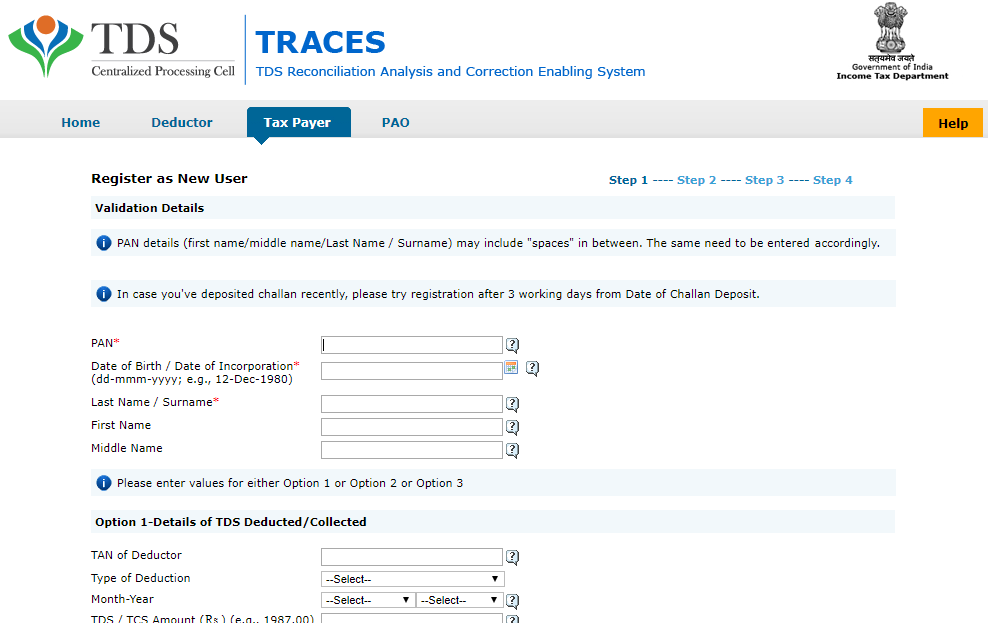 Key details that a Tax Payer needs to provide in order to complete TRACES registration include:
Along with any one of the following:
Step-3: After input of required details, click on ‘Create Account’. A confirmation screen will appear to validate the submitted details. If you want to edit any data shown on the confirmation screen, edit tab can be used in order to change the submitted information.
Step-4: On confirming the data, the account will be created an activation link and activation code will be sent to the applicant email id and mobile number.
TRACES Customer Care
TRACES Toll-free customer care number is 1800-103-0344
Alternately, you could call TDS TRACES customer care on (+91)120-481-4600 with queries related to the TRACES website.
You can also contact TRACES customer care by email at contactus@tdscpc.gov.in

Get FREE Credit Report from Multiple Credit Bureaus Check Now
A deductor is the person/entity who deducts the tax at source on specified payment made. The tax deducted by the deductor using such TDS mechanism has to be deposited with the Income Tax Department within a prescribed time limit. The TDS deductor is also required to report the details of tax deducted in a statement. Following persons are mandatorily required to file an electronic TDS statement:
Key activities/services that can be availed by the deductor on TRACES are :
The TDS TRACES Justification Report contains details of defaults/errors identified by the Income Tax Department (ITD) while processing the statement filed by the deductor during a particular quarter of the financial year.
This document provides detailed information about the defaults and/or errors that need to be rectified by the deductor. This rectification can be completed by filing a correction statement and making payment of the applicable interest /fees along any other dues that are applicable. Alternately, deductors can use the information featured in this report to provide clarifications for any of the “errors” identified by the tax authorities.
This TRACES Deductor online service allows a TRACES registered deductor to download Form 16/Form 16A. These documents contain records of tax deducted at source (TDS) and allow tax payers to file income tax return easily.
As per section 192, Form 16 is issued on deduction of tax by the employer on behalf of the employee, i.e. in case of salary income. Form 16A is issued if tax is deducted under any provision except section 192.
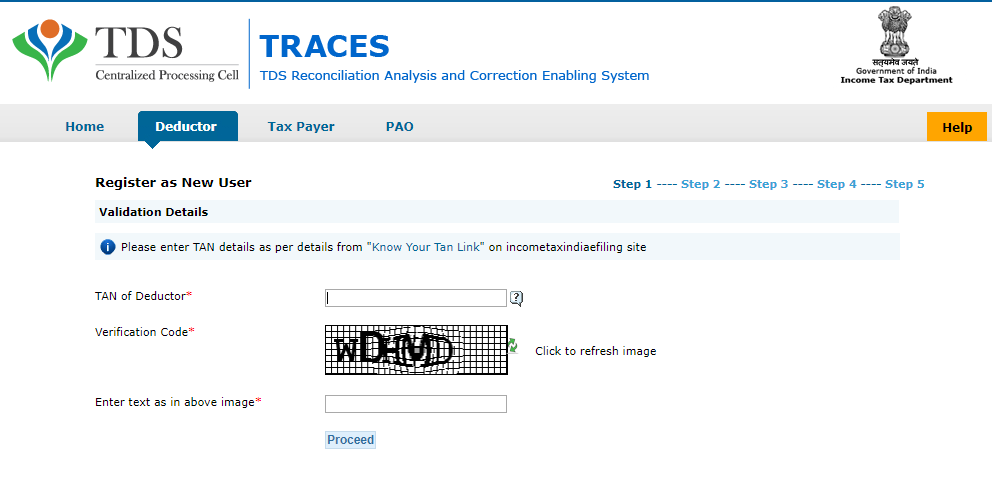
Fill out details on each step and click on submit to complete TRACES deductor registration.
If a deductor has already registered on TAN (Tax Deduction and Collection Account Number), the following are key steps for TRACES Login:
The admin user role on TRACES is created when a TAN is registered on TRACES for the first time. This role can be registered only by surrendering the TAN to an Assessing officer.
Sub user role on TRACES are created by Admin user registered on TRACES. Maximum 4 sub users can be created by the admin user of a specific TAN. A sub user can be deleted by the admin, however, once a sub-user is deleted, all details of the sub-user will be deleted from the TRACES system and Admin User will have to add all the sub-user information again to get the system activated.
Tax Payer or Deductee is a person from whom tax has been deducted. Any person whose tax has been deducted or who has deposited tax can register on TRACES. Online TRACES services available to tax payers are:
Get FREE Credit Report from Multiple Credit Bureaus Check Now
After registration, the tax payer can view tax credit (Form 26AS) online which contains following details:
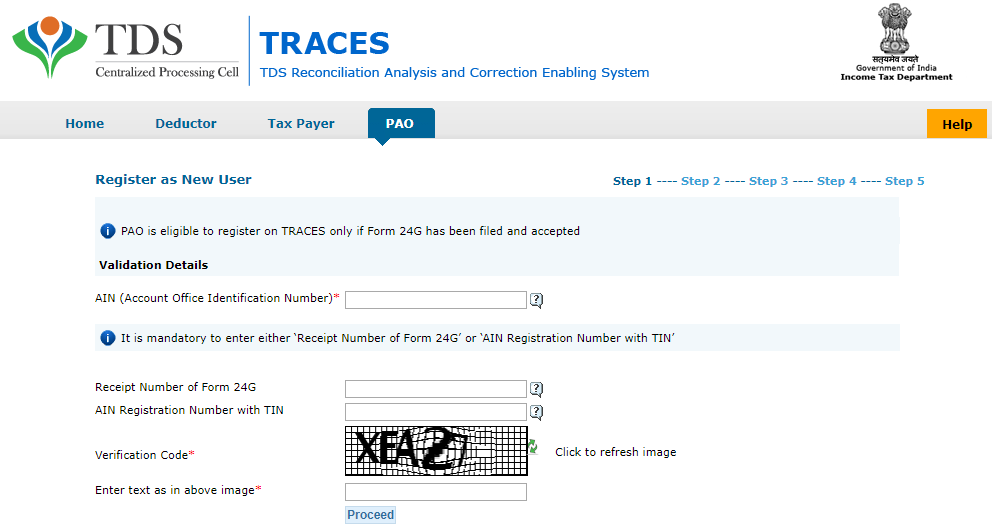
PAO stands for Pay and Account Office which is responsible for maintaining the payment records of various government employees. Drawing and Disbursing Officer (DDO) functioning under a ministry or department is a person who is authorised to draw money for specified types of payments against an assignment account or letter of credit account opened in his favour in a specified branch of an accredited bank. In respect of tax deducted by DDO, Pay and Accounts Office (PAO) is required to file FORM 24G to the agency authorised by the Director General of Income-Tax (Systems) within 10 days after the end of each calendar month.
The key services that can be availed by PAO on TRACES Portal are:
To avail the services offered by TRACES, the tax payer has to register himself on the website of TRACES. Following are the steps for registration:
All type of corrections such as Personal information, Deductee details, Challan correction, etc. can be made using online correction functionality. Following are the steps for correction in Challan:
Get FREE Credit Report from Multiple Credit Bureaus Check Now
The following are the online correction services status available to a TRACES registered individual/entity:
In case an entity level PAN is associated with more than one TAN such as -PAN of central office is taken which has multiple TANs for each of its branches. This report can be used for the purpose of identifying defaults in all TANs associated with entity level PAN. These features help in effective TDS administration, control and compliance at the organisational level. Following are the steps for generating TDS Compliance Report:
The following are the possible results of a request status check made on TDS TRACES website:
Only registered individuals/entities can avail the facility of “Request for Resolution” under the online grievances module of the TDS TRACES website. Taxpayer can upload the relevant documents along with the query. Following are the steps for resolution:
The following are the results of ticket status check options available on TDS TRACES:
Closed: The ticket has been closed by the requestor/assessing officer or auto-closed by the system due to no action been taken within the stipulated time-frame.