Download the
Paisabazaar app Today!
Paisabazaar app Today!
Get instant access to loans, credit cards, and financial tools — all in one place

Win Assured Cashback

Our Advisors are available 7 days a week, 9:30 am - 6:30 pm to assist you with the best offers or help resolve any queries.


Get instant access to loans, credit cards, and financial tools — all in one place

Scan to download on



 Personal Loan
 Business Loan
 Home Loan
 Other Loans


Our Advisors are available 7 days a week, 9:30 am - 6:30 pm to assist you with the best offers or help resolve any queries.
600 or 750? What's your credit
score? Check for FREE.


Let’s Get Started
 +91
+91
The entered number doesn't seem to be correct
If you have selected the wrong assessment year, furnished wrong PAN/TAN details or entered an incorrect amount in your TDS challan, you can lose tax credit benefits or even be charged a hefty fine. However, if you realise your error in time, you can initiate a TDS challan correction to rectify your errors and resubmit it with the tax authorities. This process, also known as OLTAS (On-line Tax Accounting System) challan correction, provides a simple method of rectification for those filing TDS returns.
The currently applicable process of TDS challan correction applies to both physical/offline challans as well as TDS challans submitted online. The current offline OLTAS challan correction procedure is applicable on payments made on or after September 1, 2011. The following is a short list of various corrections that you are allowed to make with respect to errors in an offline or online challan submitted by you:
| Fields Requiring Correction(s) | Authority who can Correct the Errors | Limit for Submission of TDS Challan Correction Request* |
| Assessment Year | Collecting bank or assessing office for physical challan
Or Concerned assessing officer for online challan |
Max. 7 business days from date of challan deposit |
| PAN or TAN | Max. 7 business days from date of challan deposit | |
| Nature of Payment | Max. 3 business days from the date of challan deposit | |
| Minor Head Code | Max. 3 business days from the date of challan deposit | |
| Major Head Code | Max. 3 business days from the date of challan deposit | |
| Total Amount | Max. 7 business days from the date of challan deposit | |
| Name | Assessing officer. (In case of both online and offline/ physical OLTAS challan correction) | NA |
*The timelines provided are indicative and may differ depending on the specific circumstances as specified by Income Tax authorities.
The following are some key facts to keep in mind before you initiate a TDS challan correction:
The TDS challan correction form can be downloaded for free from the website of various banks who accept challan payments on behalf of the tax authorities in India. While each of these forms might have small differences, the format of a TDS correction form is basically the same. Alternately, you could initiate a OLTAS challan correction request by providing the relevant correction details as per the applicable bank’s format using a blank paper form. The following is a sample of the format applicable to a typical TDS Challan correction form:
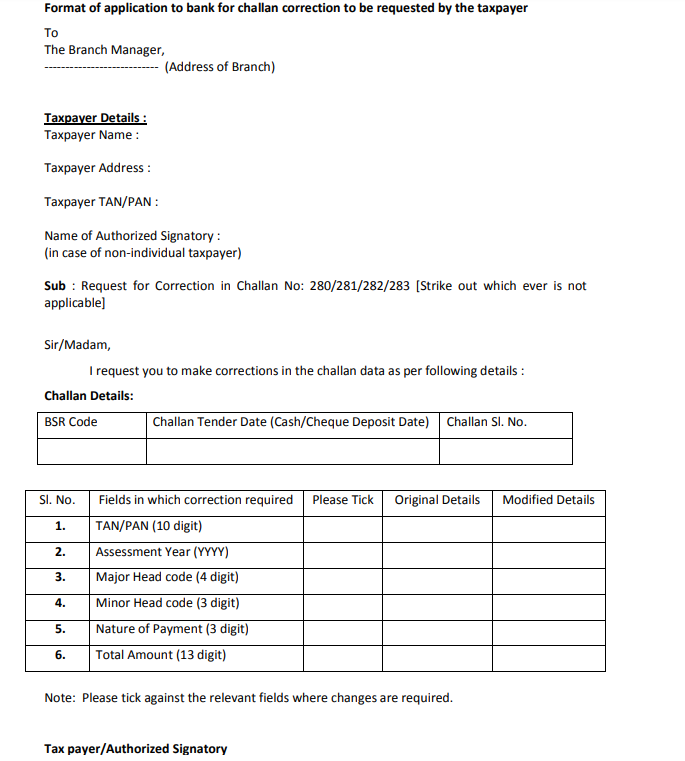 Fields to be filled out in the TDS Challan Correction Form
The following are the key fields to be filled out in an OLTAS challan correction request form:
The above application format can only be used if you are raising a TDS challan correction request with the bank subsequent to submission of the physical challan with the bank. In case you want to request correction of a challan that has been submitted online, you need to raise the correction request online.
Get FREE Credit Report from Multiple Credit Bureaus
Check Now

The following are the steps to be follow to approach a bank for the procedure:
Once the limit for approaching the bank for such a correction has expired, you can still make a request to the concerned assessing officer. However, they must be authorised under the OLTAS application to make or allow such correction in TDS challan details. The subsequent steps for requesting a challan correction request are similar to the steps when requesting such correction through the bank.
Correction in TDS challan can also be carried out online on the basis of TDS Reconciliation Analysis and Correction Enabling System (TRACES). A digital signature of the taxpayer is mandatory for registering on TRACES to make a correction online on TDS challan.
Once the taxpayer is registered on TRACES, they will need to follow the steps given below:
This 15 digit token can be used at a later date to check the status of the correction request
Using your acknowledgement number, you can easily check the status of your OLTAS challan correction request online. The following are the various correction status and the detailed of each:
| TDS Challan Correction Status | Status Details |
| Requested | The TDS challan correction request has been submitted |
| Initiated | The request is being processed by the concerned authorities or TDS CPC |
| Available | The request for TDS challan correction has accepted by the tax authorities and the statement is available for correction. You can start correcting the applicable details on the statement after this status is displayed. When you click on the hyperlink, it will take you to the validation screen. Once you click on the request with ‘Available’ status, the status of your request or statement will change to ‘In Progress’. |
| Failed | In case of any technical error, you will not be able to make the request. You have to re-submit the request to correct the TDS challan. |
| In Progress | This status means that the user is still working on the statement. By clicking on the hyperlink, you can go directly to the validation screen. |
| Submitted to the Admin User | The corrected challan statement has been submitted to the Admin User |
| Submitted to the ITD | Admin user has submitted the correction statement to the IT Department for further processing |
| Processed | The statement has been processed by the TDS CPC (either for defaults or for Form 26AS) |
| Rejected | This means the revised statement has been rejected by TDS CPC after processing. The reason(s) for such rejection will be available in the attached ‘Remarks’ column. |