Download the
Paisabazaar app Today!
Paisabazaar app Today!
Get instant access to loans, credit cards, and financial tools — all in one place

Win Assured Cashback

Our Advisors are available 7 days a week, 9:30 am - 6:30 pm to assist you with the best offers or help resolve any queries.


Get instant access to loans, credit cards, and financial tools — all in one place

Scan to download on



 Personal Loan
 Business Loan
 Home Loan
 Other Loans


Our Advisors are available 7 days a week, 9:30 am - 6:30 pm to assist you with the best offers or help resolve any queries.
600 or 750? What's your credit
score? Check for FREE.


Let’s Get Started
 +91
+91
The entered number doesn't seem to be correct
Did you receive an Income Tax Notice/ Order? Are you wondering if it is valid or not? Don’t worry! The Income Tax Department has introduced a system of computer-generated “Document Identification Number (DIN)”, which can be used to verify any communication from the IT Department.
All the communications issued by the Income Tax Department relating to enquiry, investigation, assessment, appeals, orders, penalty, verification of information, rectification, prosecution etc. issued on or after 1st October, 2019 will have a unique DIN. Let’s understand how you can use DIN to check the validity of notices and orders issued by the IT Department.
Table of Contents :
Step 1: Visit the e-filing portal of Income Tax Department.
Step 2: Click “Notice/ Order Issued by ITD” link on the left pane.
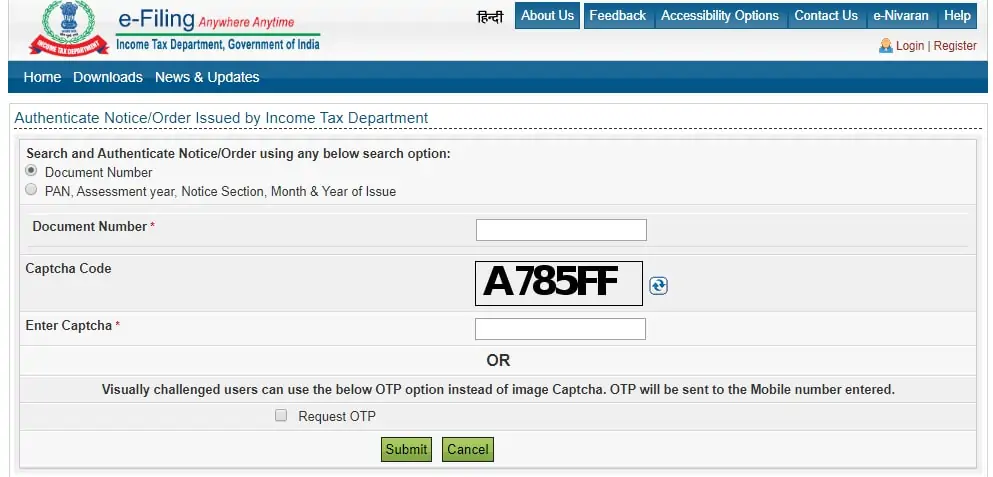
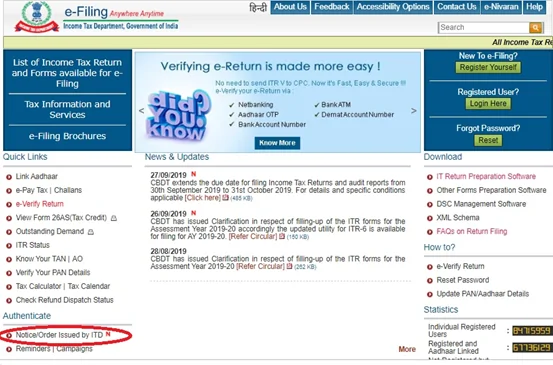 Step 3: You will be directed to the following web page, where you will see 2 ways to authenticate or validate an Income Tax notice/order:
Step 4: If you select “Document Number” as the method to validate, following web page will be displayed. Enter the DIN, captcha code and click “Submit” to check the authenticity of the order/notice.
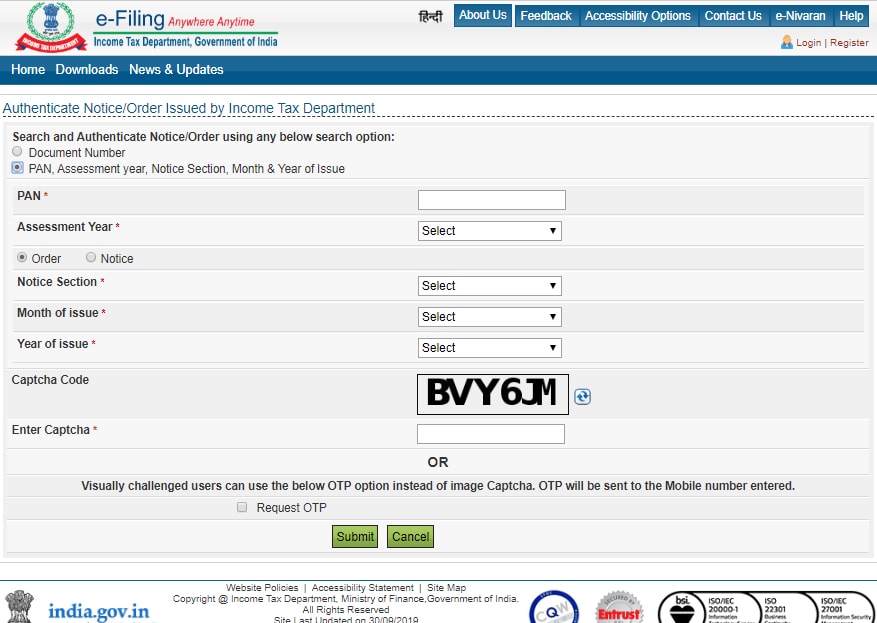
Step 5: If you select the other option, then the following web page will be displayed. Enter your PAN, assessment year, notice section, month and year of issue, captcha code and select submit to check the authenticity of the notice/order.
In addition to ensure validity of all communications issued by the Income Tax Department, the introduction of DIN will help ensure: