Download the
Paisabazaar app Today!
Paisabazaar app Today!
Get instant access to loans, credit cards, and financial tools — all in one place

Get the app — instant card and loan offers!

Our Advisors are available 7 days a week, 9:30 am - 6:30 pm to assist you with the best offers or help resolve any queries.


Get instant access to loans, credit cards, and financial tools — all in one place

Scan to download on


 Personal Loan
 Business Loan
 Home Loan
 Other Loans


Our Advisors are available 7 days a week, 9:30 am - 6:30 pm to assist you with the best offers or help resolve any queries.
Get your Free Credit Report with Monthly Updates


Let’s Get Started
 +91
+91
The entered number doesn't seem to be correct
Note: The information on this page may not be updated. For latest updates, click here.
Table of Contents :
GST (Goods and Services Tax) returns need to be submitted monthly and the requisite GST is payable by the 20th of every month. To make matters easier for GST registered businesses, the GST online payment system has been introduced which can be accessed from the GST Portal.
A key feature of the GST online payment process is the GST Payment Ledger. There are currently 3 unique GST payment ledgers:
GST Expert Assistance by PaisabazaarFinding it difficult to avail online services related to GST? Paisabazaar’s offline stores provide expert assistance for GST services. Get step-by-step expert guidance for GST registration, GST filing and GST certificate. Once your GST is set up, you can apply for a business loan to scale your business through Paisabazaar. |
Under existing GST Act rules, monthly GST returns submitted online are considered valid only if all due taxes have been cleared. Therefore, you cannot submit GST returns for the month of May without first making GST payment for the month of April. In case of late payment of GST dues, on the due amount computed from the due date an interest rate of 18% onwards is charged on per annum basis. To avoid GST late payment penalties, it is important to know about the GST online payment system and steps to pay it online.
The following is a step by step guide for making online GST payments on the official GST website.
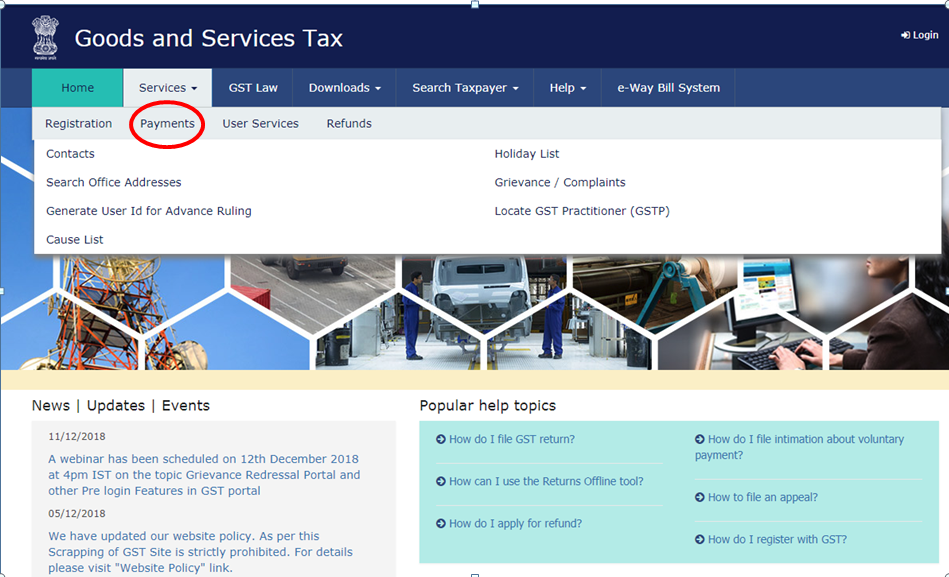
Step 1: Go to the GST portal and click on the Payments link under the Services Tab of the home page:
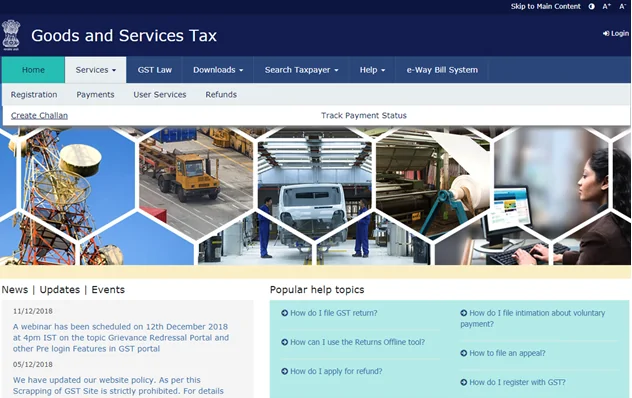
Step 2: Under the “Payments” section, select the “Create Challan” Option:
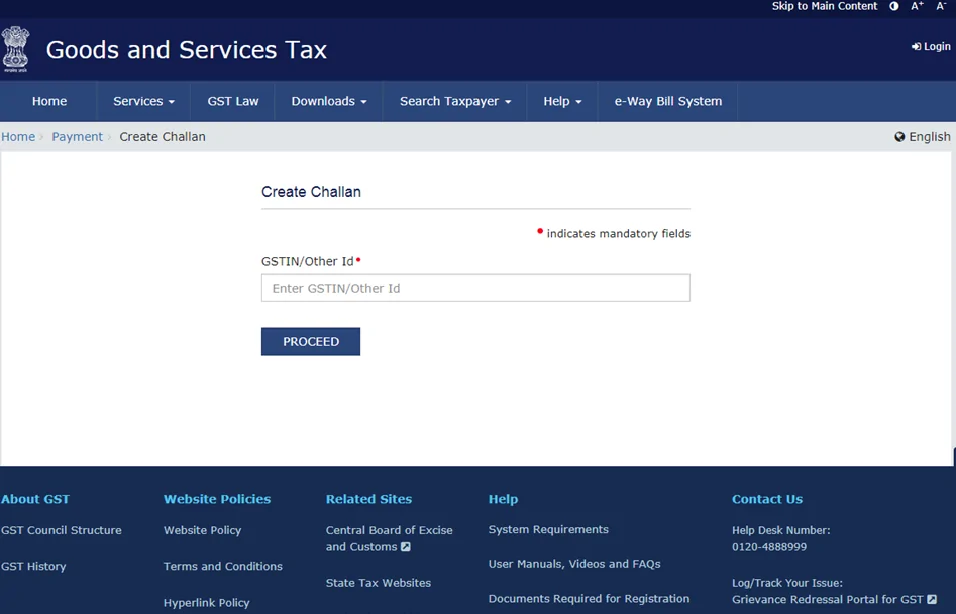
Step 3: On selecting the “Create Challan” option, you will be directed to the following page where you need to input your GSTIN to proceed.
Step 4: Once you have filled and submitted the GSTIN details, you are directed to a page where you can create a GST payment challan by filling out the required details. On this page itself, you can select the preferred payment mode. At present, you can make GST online payments using the following modes:
Alternately, offline payments can be made over the counter at branches of authorized banks (maximum limit of Rs. 10,000 per challan).
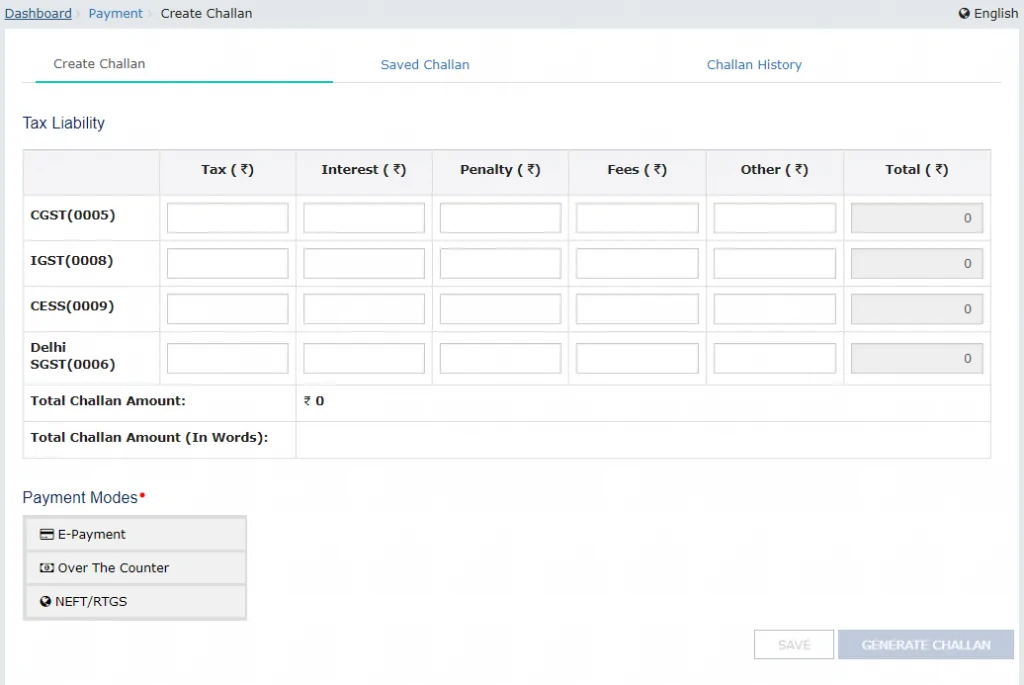
Step 5: Once the challan has been created, you can complete the GST online payment using the applicable payment format. Alternately, in case you are paying offline i.e. over the counter, you have to take a print out of the GST Payment Challan and submit it with the authorized bank along with your GST payment.
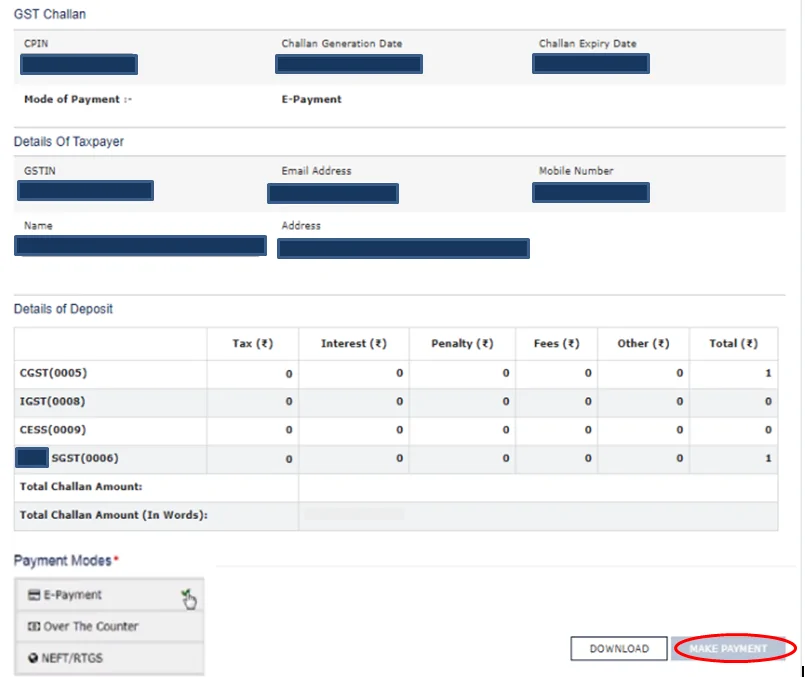
The GST Payment Challan is a key document that needs to be created online, as part of the GST Online Payment Process.
Key components of GST Payment Challan includes:
In order to make GST payment online, you simply need to click the “Make Payment” link after selecting the E-Payment option.
A physical copy (print out) of the GST Payment Challan is required if you are paying GST through a bank branch. Only some banks are authorised to accept GST payments. Offline GST payments made over the counter at authorized banks are currently limited to Rs. 10,000 per challan.
In this method, you are required to log into your GST account. Instead of going to “Payment” option in Step 1 of GST online payment system described above, you log into your GST account. The login page is as follows:
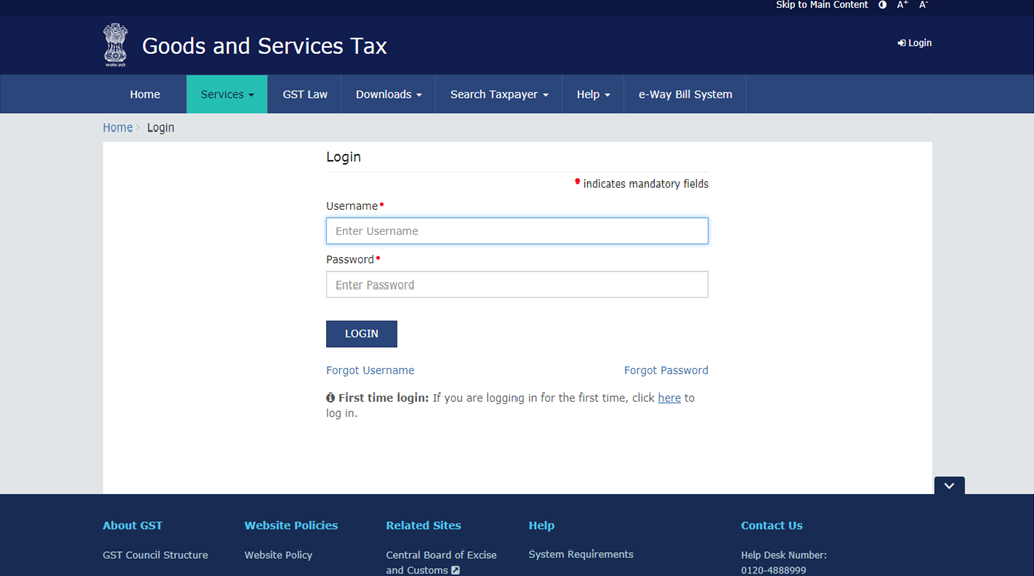
On entering your GST account credentials, you will be logged into your GST account which includes a dashboard view as well as the option to “Create Challan” located under the “Services” menu.
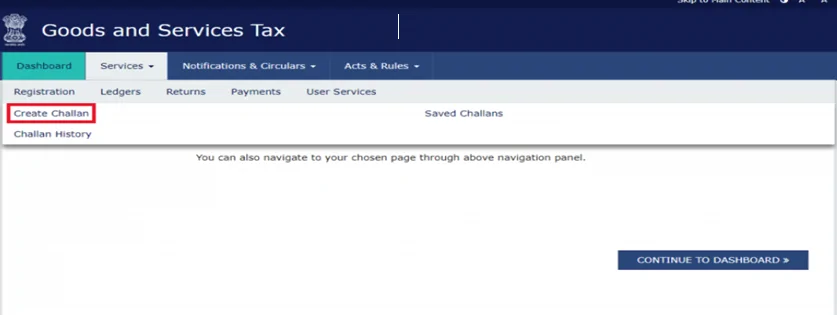
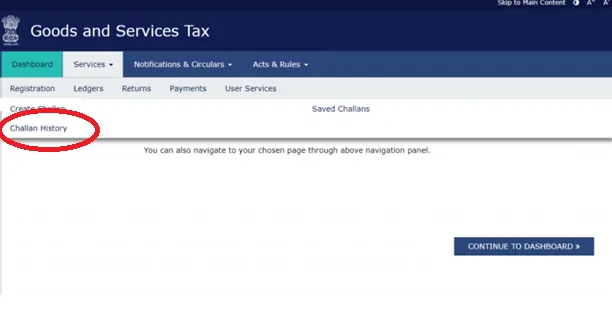
The same page also contains related links such as “Challan History” which shows a list of all the GST Payment Challans that have been created and paid previously. The other link is named “Saved Challans” that displays a list of challans that have been saved by the taxpayer for future reference and may be unpaid as of yet.
The “Create Challan” option directs you to the following page:
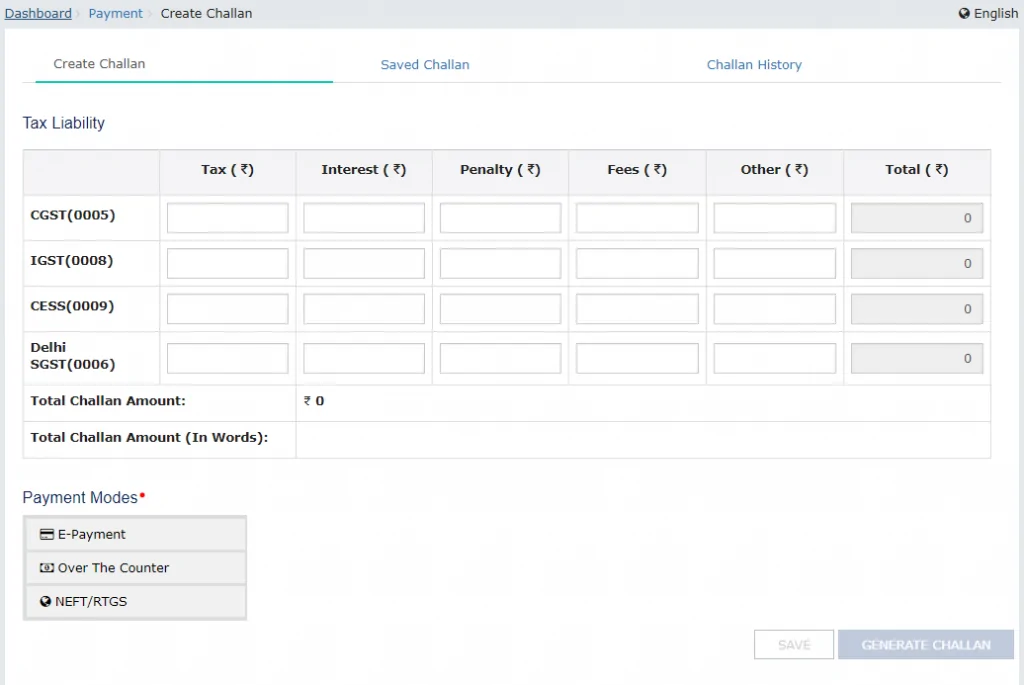
You need to fill out the required information and click on “Generate Challan” to create a new GST Challan for payment of dues. On the same page, you can also choose the format for GST online payment (E-Payment through debit card/netbanking or NEFT/RTGS) or the offline (over the counter) option.
Tracking GST Payment Status is easier than ever as the direct link to “Track Payment Status” is located just under the Services > Payments button on the GST website homepage as shown below:
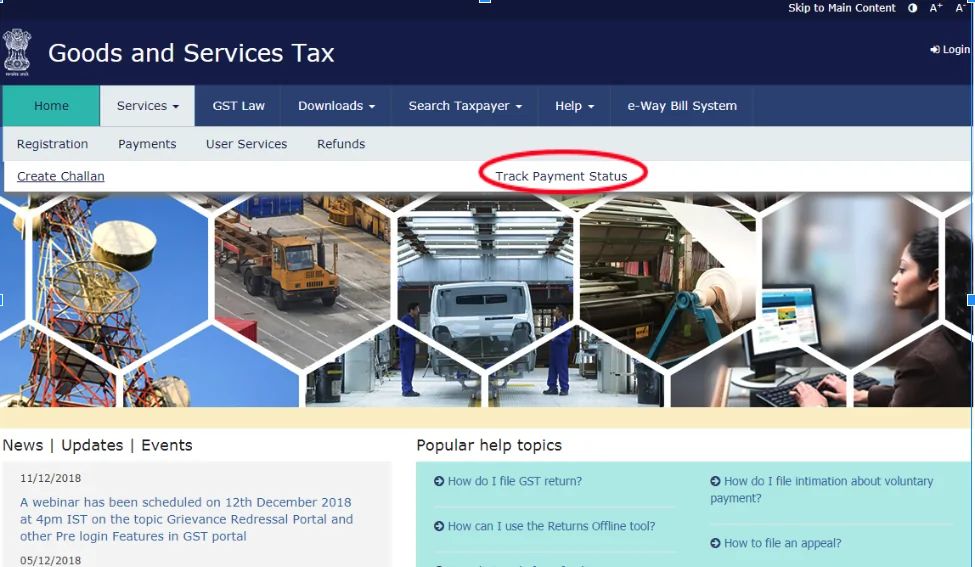
On clicking the “Track Payment Status” link, the following page is displayed:
After you fill in your GSTIN and the CPIN details of the previously paid GST challan, the current status of the payment will be displayed.
If you wish to view the entire GST payment history, log in to your GST Account online and check the Challan history menu under the “Services” tab as shown below: