Download the
Paisabazaar app Today!
Paisabazaar app Today!
Get instant access to loans, credit cards, and financial tools — all in one place

Win Assured Cashback

Our Advisors are available 7 days a week, 9:30 am - 6:30 pm to assist you with the best offers or help resolve any queries.


Get instant access to loans, credit cards, and financial tools — all in one place

Scan to download on


 Personal Loan
 Business Loan
 Home Loan
 Other Loans


Our Advisors are available 7 days a week, 9:30 am - 6:30 pm to assist you with the best offers or help resolve any queries.

Check Free Credit Score & Win up to ₹1 lakh


Let’s Get Started
 +91
+91
The entered number doesn't seem to be correct

The e-Way bill is a key document that has to be generated online for the transport of goods within the country subsequent to implementation of the GST system. Under the GST regime of “One Nation – One Tax”, a single eWay bill (electronic Way bill) is valid across all states and union territories. As only a single document is valid across India, the e Way bill system is designed to make the transport of goods smoother and faster. All GST taxpayers have to generate a valid eWay bill when goods are transported from one location to another subject to some key terms and conditions. In the following sections we will discuss key aspects of the GST way bill system including how to login to the eWay Portal and how to generate an eWay bill.
Table of Contents :
A GST eWay Bill often known as a way bill is a document issued by a seller to a transporter giving details and instructions relating to the shipment of goods. Prior to the introduction of GST eway bill, a VAT way bill was used for the same purpose. However, the previous document varied from one state to another. Key details included in this document include name of consignor (supplier), consignee (recipient), the point of origin, destination, and route.
Similarly, an e-Way Bill (Form GST EWB-01) is an electronically generated way bill under the GST regime. In the eWay billing system, a supplier has to upload the relevant information about the goods being transported on the eWay bill portal before starting the transport. Alternatively, eWay bill can be generated through the SMS/ e Way bill android app. Once the eWay Bill is generated, the system automatically generates and allocates a unique eWay Bill Number (EBN) that serves as an unique identifier for the transport of specified goods. This documents can be accessed all stakeholders including the supplier, recipient, transporter and tax official.
An e-Way bill has two components, Part A and Part B.
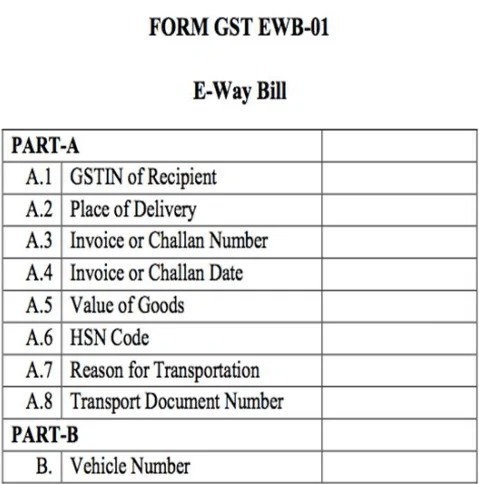
Part A: This comprises details of GSTIN for the recipient, the place of delivery (PIN code), invoice or challan number and date, value of goods, HSN code, reason for transportation and transport document number.
Part B: It comprises the vehicle number in which the goods will be transported.
As per Rule 138 of the CGST Rules, every registered person who causes movement of goods (which may or may not be on account of supply) of consignment value more than Rs. 50,000 is required to generate an eWay bill before starting the transport. Reasons other than supply include sales return, stock transfer, movement for job work, inward supply from unregistered persons, etc.
Note: When neither the consignor nor the consignee generates the e-way bill and the value of goods is more than Rs.50,000 it shall be the responsibility of the transporter to generate it.
Also, where handicraft goods are transported from one State to another by a person who has been exempted from the requirement of obtaining registration, the way bill has to be generated by the said person irrespective of the value of the consignment.
| Who should Generate? | When to Generate eWay Bill? | What action to take? |
| Supplier (Registered Person under GST) | Before initiating the transport of goods worth more than Rs. 50,000 | Fill Part A of Form GST EWB-01 (eWay bill) |
| Recipient(Registered person under GST) | Before the transport of goods worth more than Rs. 50,000 is initiated | Fill Part B of Form GST-EWB-01(eWay bill) |
| Supplier(Registered Person under GST) | When the recipient does not fill Part B and the goods have been handed over to the transporter | Fill Part B of Form GST EWB-01 (eWay bill) |
| Transporter | When goods are handed over to the transporter and both the parts of the eWay bill have been filled | Generate the eWay bill from the portal on the basis of information supplied in Part A |
| Recipient(Registered Person under GST) | When goods are supplied by an unregistered supplier to a registered recipient, the recipient is solely responsible for compliance with GST way bill procedures | Fill Form GST EWB-01 (eWay bill) |
| Supplier/Transporter | When goods are transported within the State/UT for a distance of less than 10 km from the place of supplier to the place of transporter for further transportation | Only Part A should be filled. May leave Part B of the Form GST EWB-01 (eWay bill) |
Note: A registered person or the transporter may generate an e-Way bill as per their choice even when the value of consignment is less than Rs. 50,000.
You can login to the eWay bill portal after registering/enrolling in the e Way bill system. The following are the key steps for generating a GST way bill on the Official eWay Bill Portal (www.ewaybillgst.gov.in).
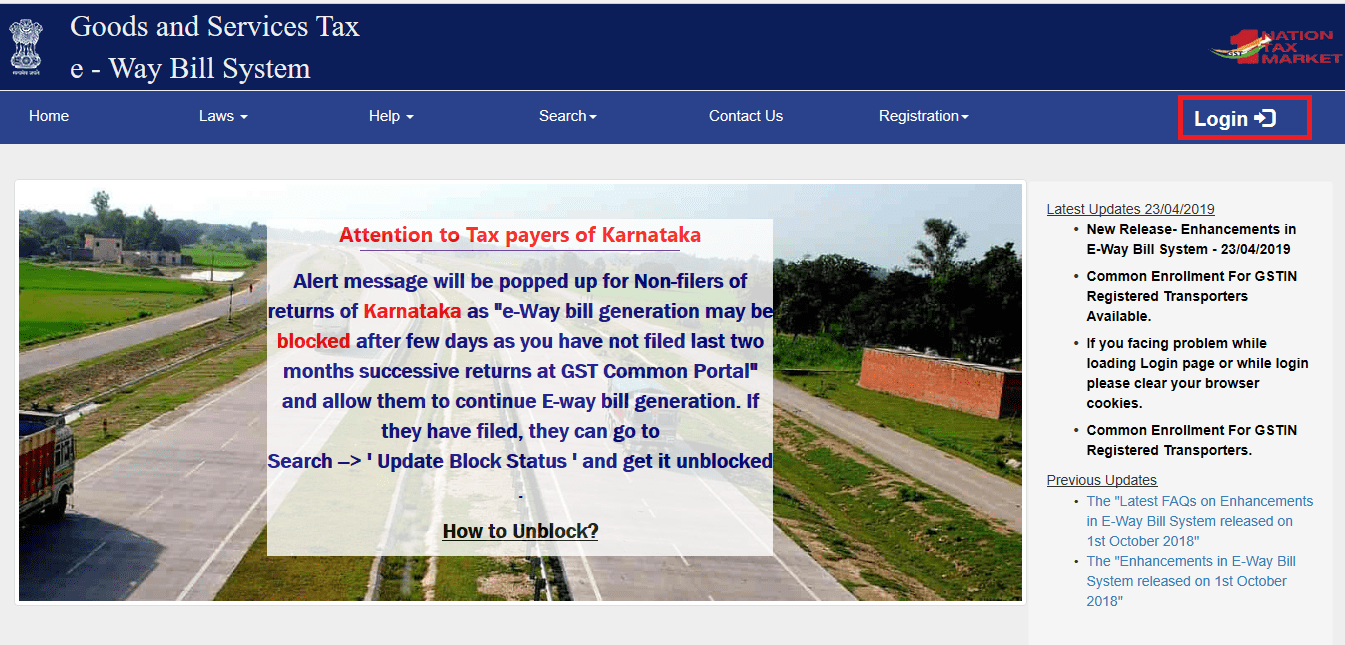
Step 1: Visit the e-Way bill portal and click on Login.
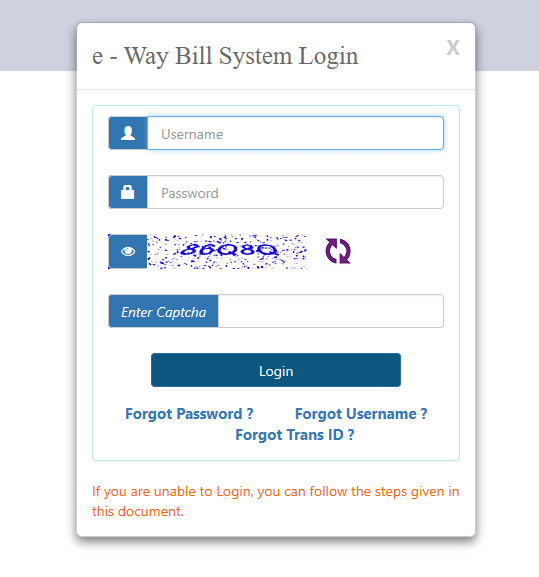
Step 2: Enter the username and password that you had created at the time of registration/enrolment in the e Way bill system. Also, provide the displayed captcha and click login.
Also read: Procedure to Register/Enrol on the eWay Bill Portal
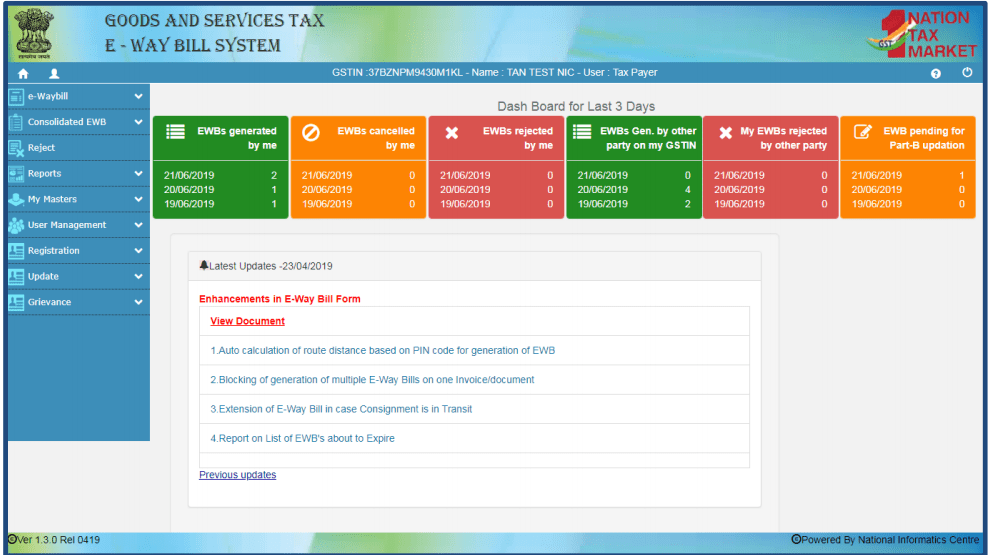
 Step 3: You will see the following Home Page upon successfully logging into the eWay bill system. It lists all available options to operate the eWay billing portal.
You can generate the eWay bill after logging in to the eWay bill portal. Please note that before initiating a new eWay Bill (EWB) generation, you should have details of the invoice/bill/challan document and Transporter Id of the transporter who will carry the goods.
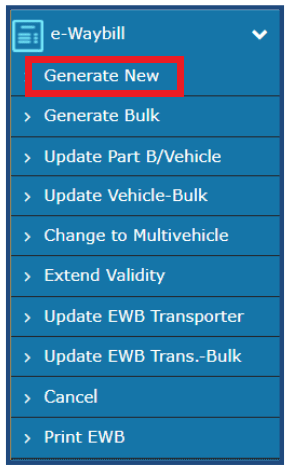
Step 1: Click “Generate New” under the eWay bill option on the Main Menu as shown below.
Step 2: The following eWay Bill (EWB) Entry Form will be displayed. Here you will need to enter details of the new GST eWay bill to be generated.
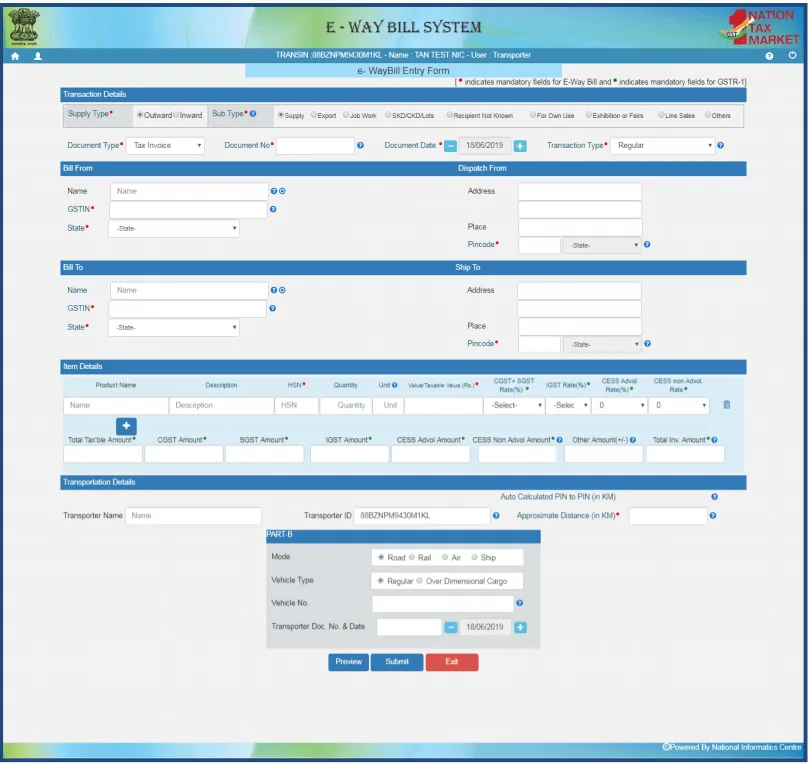
Step 3: Select the type of transaction i.e. Outward or Inward in the EWB entry form. In the GST system, the outward transaction indicates that the user is supplying the goods and inward indicates that the user is receiving the goods.
Step 4: Depending upon the type of transaction selected, the system will show the sub-type of transactions. Select the sub-type accordingly. Now the system will display only the relevant document types in “Document Type” dropdown. You can now upload/fill out the relevant documents.
Step 5: In the “Transporter Details” section, enter the transporter name, transporter ID and approximate distance to be covered by the shipment. Please note that a transporter ID or vehicle number is required to generate the eWay bill (EWB).
If a transporter is generating the eWay bill on behalf of the supplier/recipient, then the entire EWB entry form should be filled by the transporter.
Once a request for EWB is submitted, the system validates the entered values and generates a unique 12-digit EWB number.
Note: The eWay bill is not valid for movement of goods until Part B of the form is updated. Only after providing the Part B details, the system will show validity of the eWay bill on the basis of approximate distance.
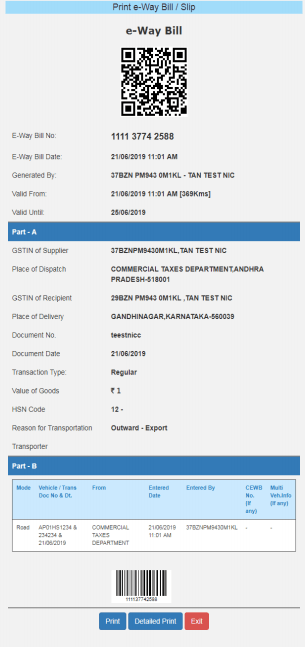
Step 6: You may print a copy of the eWay bill by clicking “Print”. The following image shows a sample eWay bill.
How to generate Bulk eWay Bills?
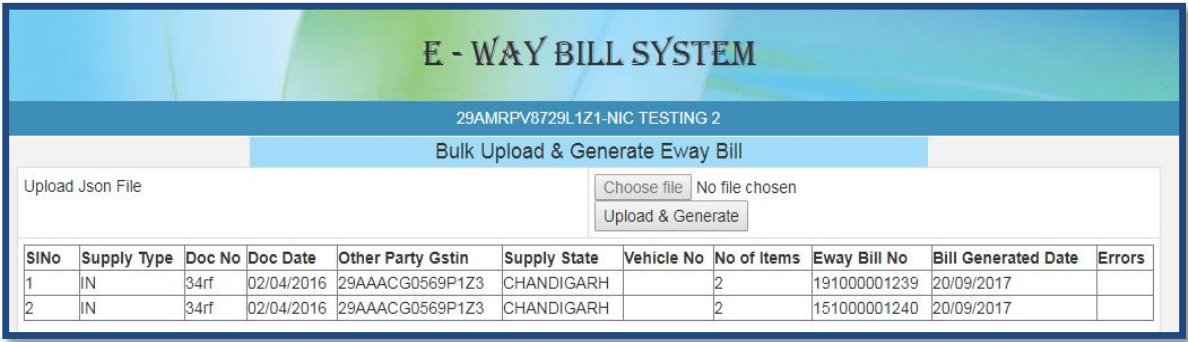
For larger companies it may not be practical to generate GST way bills one at a time. In such situations, you can utilize the “Generate Bulk” option that allows you to generate multiple eWay bills at the same time. You will need to have EWB bulk converter to generate bulk eWay bills. It helps to convert multiple e-Way Bills excel file into a single JSON file that can be uploaded to the GST website.
Step 1: Login to the eWay bill portal.
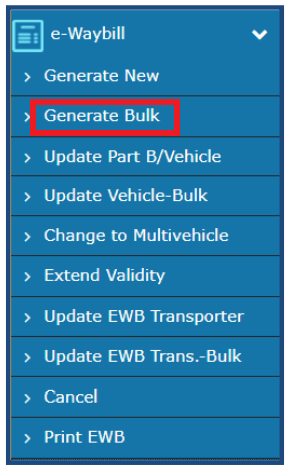
Step 2: Click on the “Generate Bulk” option under the eWay bill tab in the Main Menu.
Step 3: Choose and upload the relevant JSON file (up to 5MB). Click “Upload”.
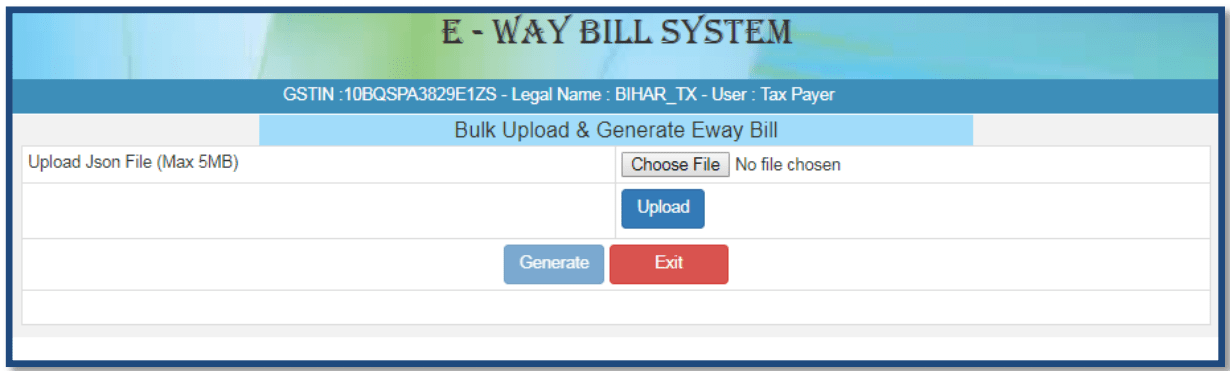
Step 4: After processing the JSON file, the system generates eWay bills and shows e-Way bill number (EWB) for each bill. Click “Upload & Generate” to generate the bulk eWay bills.
Under existing GST rules, the validity of an e-Way bill depends on the distance over which the goods have to be transported.
| Distance | Validity (from the date of eWay bill generation) |
| Less than 100 km | 1 day |
| For every 100 km thereafter | 1 additional day |
For example: A truck loaded with goods has to travel 350 km to the place of business of the recipient. eWay bill for this consignment was generated at 5 pm on 1st April, 2019. The eWay bill in this case will be valid for 4 days from the date of generation of the eWay bill, i.e., till 5 pm of 5th April.
Note: Validity of GST eWay bill may be extended under certain conditions. In such a case, another e Way bill has to be generated after updating the details in Part B of the Form GST EWB-01.
The following are some of the key instances when you do not need to generate e way bill as per current GST rules:
If required, a GST eWay bill can be canceled within 24 hours of its generation in cases where the goods have not been transported, or when incorrect details are mentioned in the e Way bill, etc.
Following is the step-by-step procedure to cancel an eWay bill
Step 1: Visit the Government eWay Bill Portal (www.ewaybillgst.com)
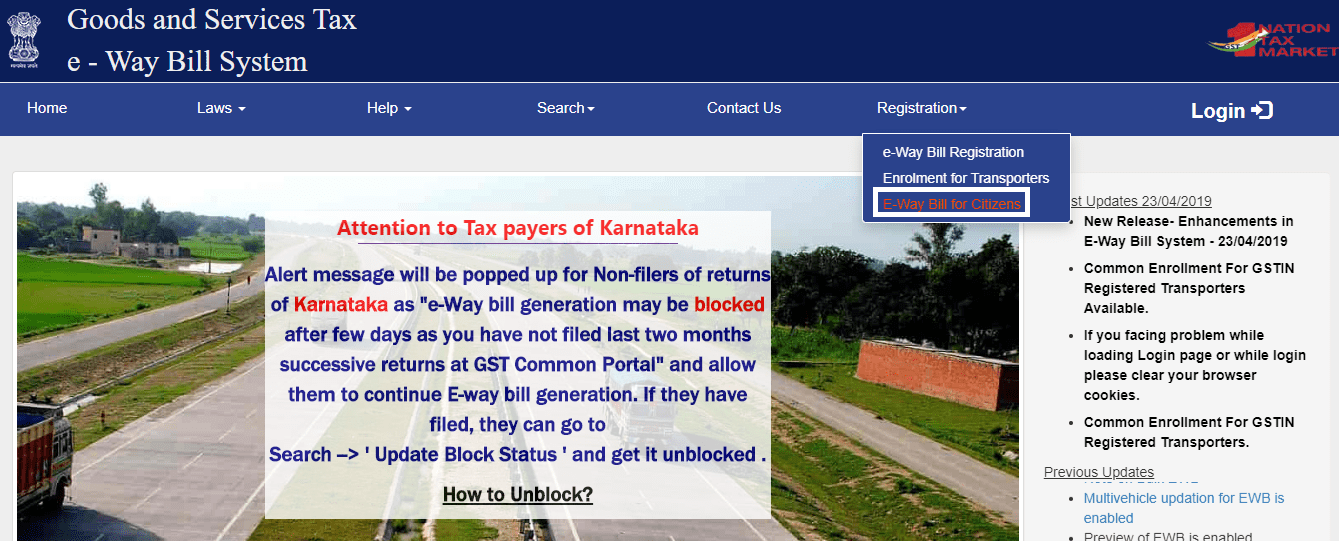
Step 2: Click on “e-Way bill for Citizens” under the Registration tab.
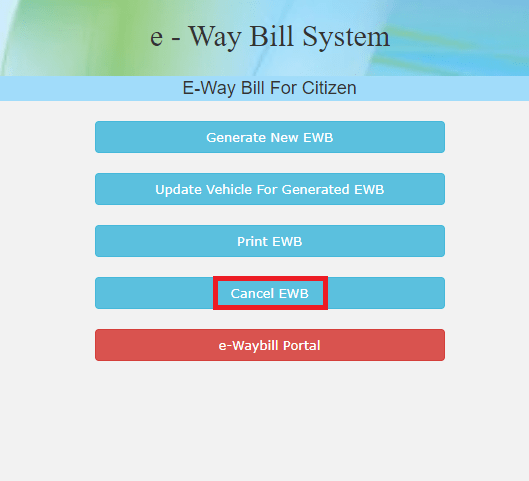
Step 3: Select “Cancel EWB” option.
Step 4: Enter your registered mobile number and the 12-digit EWB number to get an OTP. Enter the OTP received on your registered mobile number and click “Verify OTP”.
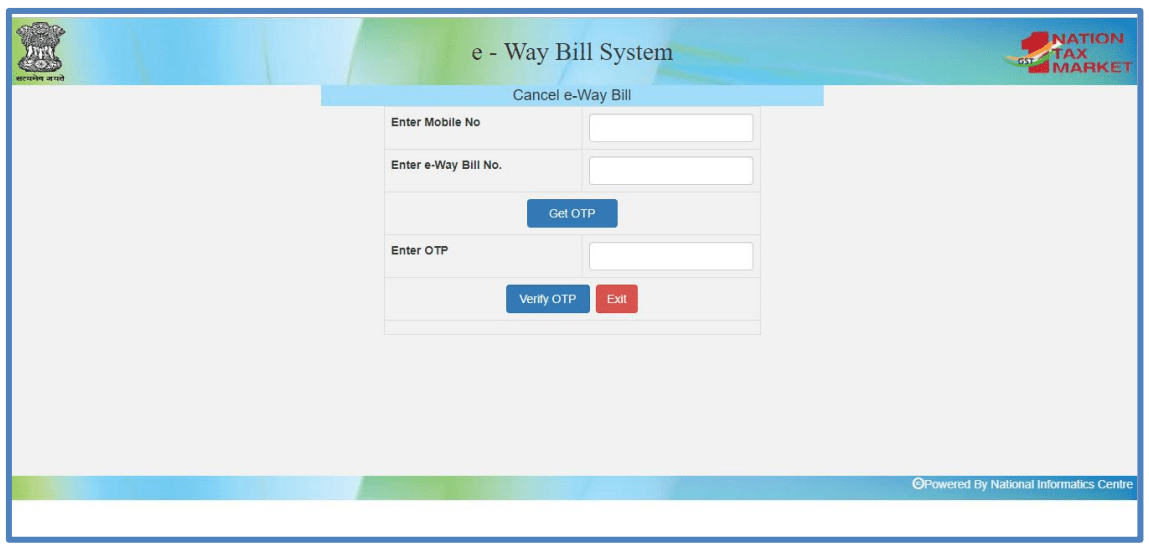 Step 5: Give a suitable reason for cancellation of the eWay bill and cancel it. Please note that once the e-Way Bill is canceled it’s illegal to use the same.
Note: The e-Way Bill once generated cannot be deleted. Further it cannot be canceled, if it has been verified by a recognized GST official.
Further Reading Suggestion: eWay Bill Registration Process & RFID Tagging.